


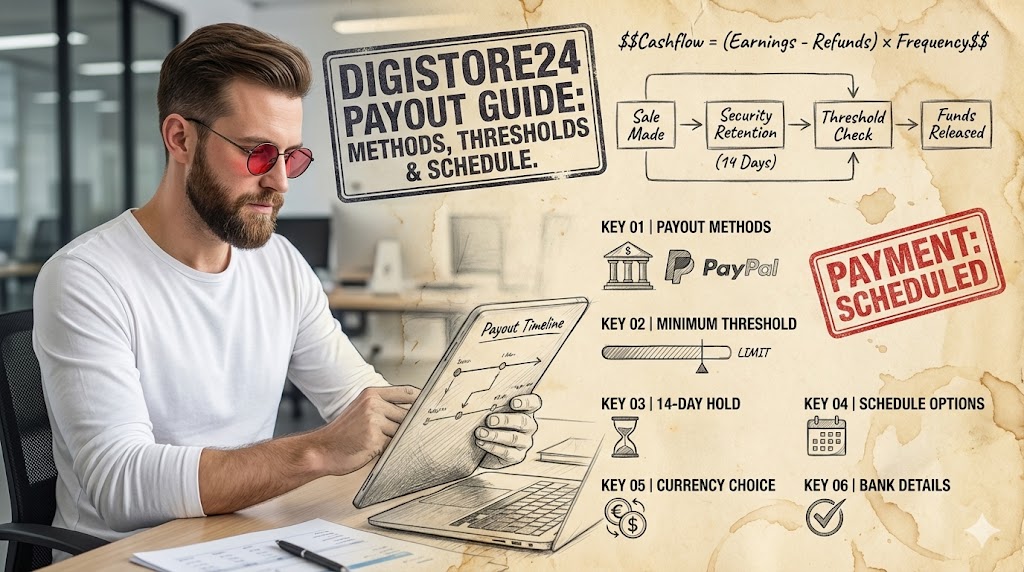
Digistore24 Payout Guide: Methods, Thresholds & Schedule
Digistore24 payouts are processed weekly, bi-weekly, or monthly, offering flexibility through various methods like bank transfer, PayPal, and international wire. Users must meet specific minimum payout thresholds and adhere to a 14-day security retention period before funds are released. Understanding these parameters is crucial for efficient financial planning and access to earned commissions.
- Ensures timely access to earnings by understanding the system.
- Helps optimize financial flow by selecting appropriate payout methods.
- Minimizes potential delays and issues through proper setup and compliance.
Understanding Digistore24 Payout Fundamentals
Digistore24 operates as a comprehensive online sales platform for digital products, physical goods, and services, facilitating transactions between vendors and affiliates. A core aspect of this ecosystem is the robust payout system, designed to ensure that all participants receive their earned commissions and revenues reliably. The platform’s structure includes a crucial security retention period, which is a standard measure to mitigate risks like chargebacks and refunds. This period typically lasts 14 days, ensuring that funds are stable before being released.
The fundamental principle behind Digistore24’s payout mechanism is transparency and security. Every transaction is meticulously recorded, and commissions are calculated automatically based on predefined agreements between vendors and affiliates. Understanding the various components of this system is essential for both new and experienced users to manage their expectations and financial operations effectively. It involves recognizing the different payout frequencies, available methods, and the critical role of the retention period in securing earnings.
- Commission Calculation: Automated based on product price and affiliate/vendor agreements.
- Security Retention: A mandatory 14-day period to cover potential refunds or chargebacks.
- Payout Frequencies: Options for weekly, bi-weekly, or monthly disbursements.
- Currency Options: Payouts can be made in EUR, USD, or CHF, depending on the recipient’s bank and settings.
Available Payout Methods Explained
Digistore24 offers a range of payout methods to accommodate its global user base, ensuring flexibility and accessibility for receiving earnings. The primary methods include standard bank transfers (SEPA for Europe, SWIFT for international), PayPal, and in some regions, specific local payment solutions. Each method comes with its own set of advantages, processing times, and potential fees, which users must consider when configuring their payout settings.
Choosing the right payout method is a strategic decision that can impact the speed and cost of receiving funds. For instance, SEPA transfers are generally fast and free within the Eurozone, while international SWIFT transfers might incur bank fees and take longer. PayPal offers convenience but may have its own transaction fees. It is crucial to evaluate these factors based on geographical location, desired speed, and the volume of earnings. Proper selection ensures that funds are received efficiently and with minimal deductions.
- Bank Transfer (SEPA): Ideal for Eurozone residents, typically fast and low-cost.
- Bank Transfer (SWIFT/International Wire): Suitable for recipients outside the Eurozone, may involve higher fees and longer processing times.
- PayPal: A convenient option for many, but users should be aware of PayPal’s own transaction fees and currency conversion rates.
- Cryptocurrency Payouts: While not a standard offering, some third-party integrations or future developments might explore this, though currently, it’s not a direct Digistore24 option.
Myth
Digistore24 automatically converts all earnings to my local currency before payout.
Reality
Digistore24 primarily processes payouts in EUR, USD, or CHF. While it can convert earnings from other currencies (e.g., GBP) into one of these payout currencies, your bank will handle the final conversion to your local currency, potentially incurring additional fees and exchange rate variations. Setting your payout currency to match your bank’s primary currency can minimize these costs.
Navigating Payout Thresholds and Minimums
To ensure efficient processing and minimize transaction costs, Digistore24 implements specific payout thresholds. These minimum amounts must be accumulated in a user’s account before a payout can be initiated. The default minimum payout is 50 EUR/USD/CHF, but users have the flexibility to adjust this threshold upwards in their account settings. This feature is particularly useful for those who prefer to accumulate larger sums before receiving a disbursement, thereby potentially reducing the frequency of bank fees or PayPal charges.
Understanding and managing these thresholds is a critical aspect of financial planning for Digistore24 users. If the accumulated earnings do not meet the set minimum, the funds will simply remain in the account until the threshold is reached. This mechanism prevents numerous small transactions that could be inefficient for both the platform and the recipient. It is advisable to set a threshold that aligns with personal financial needs and the expected volume of earnings. For example, a high-volume vendor might set a higher threshold to consolidate payouts, while a new affiliate might stick to the default to access funds sooner.
- Default Threshold: 50 EUR/USD/CHF is the standard minimum for payouts.
- Adjustable Minimum: Users can increase their personal payout threshold in their account settings.
- Impact on Frequency: A higher threshold means less frequent, but potentially larger, payouts.
- Currency Specificity: The threshold applies to the selected payout currency (EUR, USD, or CHF).
Optimize Your Threshold
For international bank transfers, consider increasing your payout threshold significantly (e.g., to 500 EUR) to reduce the impact of fixed international transfer fees. This strategy ensures a larger net amount reaches your account after bank deductions.
The Digistore24 Payout Schedule
Digistore24 offers a flexible payout schedule, allowing users to choose between weekly, bi-weekly, or monthly disbursements. This flexibility is designed to cater to different financial management preferences and cash flow requirements. Regardless of the chosen frequency, all payouts are subject to the mandatory 14-day security retention period, meaning funds become available for payout only after this period has elapsed from the transaction date. This ensures the stability of earnings against potential refunds or chargebacks.
The selection of a payout schedule should be a deliberate choice, aligning with individual or business financial cycles. For instance, businesses with high operational costs might prefer weekly payouts to maintain steady cash flow, while those with lower immediate needs might opt for monthly payouts to simplify accounting. It is important to note that the payout day of the week is fixed once chosen, and changes to the schedule or payout method typically take effect from the next payout cycle. Consistent monitoring of the payout calendar within the Digistore24 dashboard helps in predicting fund availability.
- Weekly Payouts: Funds disbursed every week, subject to the 14-day retention.
- Bi-Weekly Payouts: Funds disbursed every two weeks, providing a balanced frequency.
- Monthly Payouts: Funds disbursed once a month, ideal for consolidating earnings and simplifying bookkeeping.
- Fixed Payout Day: Once a schedule is selected, payouts occur on a specific day of the week (e.g., every Wednesday for weekly payouts).
Optimizing Your Payout Settings for Efficiency
Effective management of your Digistore24 payout settings can significantly enhance financial efficiency and reduce potential delays. This involves not only selecting the appropriate payout method and schedule but also ensuring all personal and banking details are accurate and up-to-date. Incorrect information is a leading cause of payout failures, resulting in frustrating delays and administrative overhead. Regularly reviewing these settings, especially after any changes to bank accounts or personal details, is a crucial best practice.
Beyond basic accuracy, optimizing settings also includes strategic choices regarding currency and threshold. If your primary bank account is in USD, setting your Digistore24 payout currency to USD can help avoid unnecessary currency conversion fees imposed by your bank. Similarly, adjusting your payout threshold to match your financial goals can prevent numerous small transfers or ensure timely access to larger sums. Proactive optimization ensures a smooth and cost-effective flow of funds from Digistore24 to your chosen account.
- Verify Bank Details: Double-check account numbers, SWIFT/IBAN codes, and recipient names for accuracy.
- Match Payout Currency: Select a payout currency that aligns with your primary bank account to minimize conversion fees.
- Adjust Threshold Strategically: Set a minimum payout that suits your cash flow needs and minimizes transaction costs.
- Regular Review: Periodically check and update your payout settings, especially after any personal or banking changes.
The Payout Delay Trap
The Trap An affiliate consistently experienced delays in receiving their weekly Digistore24 payouts. Upon investigation, it was discovered they had recently changed banks but forgot to update their payout details in Digistore24. Funds were repeatedly bounced back, causing a three-week delay.
The Win After updating their bank details and confirming the changes, the affiliate received their accumulated funds in the next scheduled payout. This highlighted the critical importance of immediate and accurate updates to payout information.
Handling Payout Delays and Troubleshooting
While Digistore24’s payout system is generally reliable, delays can occasionally occur. These delays are often attributable to common issues such as incorrect bank details, unmet payout thresholds, or bank holidays. The first step in troubleshooting any payout delay is to meticulously check your Digistore24 account settings to ensure all information, particularly bank account numbers and recipient names, is accurate. Even a single digit error can prevent a successful transfer.
If account settings are confirmed correct, the next step involves reviewing the payout history within your Digistore24 dashboard to ascertain the status of the transfer. It is also important to consider the 14-day security retention period; funds are not eligible for payout until this period has passed. Should the issue persist after these checks, contacting Digistore24 support with specific transaction details and screenshots of your payout settings is the recommended course of action. They can provide insights into the internal status of the transfer and guide you on further steps, potentially involving your bank.
- Check Account Details: Verify bank account number, IBAN/SWIFT, and recipient name in Digistore24 settings.
- Review Payout History: Confirm the status of the expected payout within your Digistore24 dashboard.
- Consider Retention Period: Ensure the 14-day security retention period has fully elapsed for the funds in question.
- Contact Support: If issues persist, reach out to Digistore24 support with all relevant transaction details and screenshots.
Tax Implications and Compliance for Digistore24 Earnings
Earning income through Digistore24, whether as a vendor or an affiliate, comes with important tax implications that vary significantly based on your country of residence and local tax laws. It is crucial for all users to understand their obligations regarding income tax, VAT (Value Added Tax), or sales tax. Digistore24 itself does not provide tax advice, but it does offer functionalities to help users manage their tax-related information, such as declaring their tax status and providing VAT IDs where applicable. Proper compliance is not just a legal requirement but also essential for avoiding penalties and ensuring the long-term viability of your online business.
For businesses operating within the EU, understanding VAT regulations is particularly complex, especially concerning digital products and cross-border sales. Digistore24 handles VAT collection and remittance for certain types of products and sales, simplifying compliance for vendors. However, affiliates and vendors are ultimately responsible for reporting their earnings to their respective tax authorities. Consulting with a qualified tax advisor specializing in e-commerce and international income is highly recommended to ensure full compliance and optimize tax strategies. This proactive approach helps in correctly categorizing income, claiming eligible deductions, and fulfilling all reporting requirements.
- Local Tax Laws: Understand and comply with income tax laws in your country of residence.
- VAT/Sales Tax: Be aware of VAT (for EU) or sales tax obligations, especially for digital products and cross-border transactions.
- Digistore24’s Role: The platform handles VAT collection for certain products but individual reporting remains your responsibility.
- Professional Advice: Consult a tax advisor for personalized guidance on e-commerce earnings and international tax compliance.
Streamline Tax Reporting
Utilize Digistore24’s reporting features to download detailed sales and commission reports. These documents are invaluable for your accountant and simplify the process of accurately declaring your income and expenses at tax time.
Advanced Strategies for Affiliates and Vendors
Beyond the basic setup, both affiliates and vendors can employ advanced strategies to optimize their Digistore24 payout experience. For affiliates, this might involve strategically promoting higher-commission products to reach payout thresholds faster or diversifying their product portfolio to ensure a steady stream of earnings. Vendors can focus on optimizing their product sales funnels to reduce refund rates, thereby minimizing the impact on their net payouts after the security retention period. Both parties benefit from a deep understanding of the platform’s analytics to identify trends and make informed decisions.
Another advanced strategy involves leveraging the platform’s multi-currency options. If you operate in a region where the local currency is volatile against EUR or USD, you might consider holding funds in a more stable currency within Digistore24 until a favorable exchange rate for conversion to your local bank account. This requires careful monitoring of currency markets. Additionally, for high-volume users, exploring options for dedicated business bank accounts that offer better international transfer rates or lower transaction fees can lead to significant savings over time. These proactive measures transform payout management from a passive process into an active financial optimization strategy.
- Product Portfolio Diversification: Affiliates can promote a mix of products to ensure consistent earnings and faster threshold attainment.
- Refund Rate Optimization: Vendors should focus on customer satisfaction and clear product descriptions to reduce refund rates, impacting net payouts.
- Multi-Currency Management: Strategically hold funds in stable currencies within Digistore24 to mitigate exchange rate risks.
- Dedicated Business Accounts: Consider business bank accounts with favorable international transfer fees for high-volume payouts.
Security Measures and Best Practices for Payouts
Ensuring the security of your Digistore24 account and payouts is paramount to protecting your earnings. The platform itself employs robust security measures, but users also bear responsibility for implementing best practices. This includes using strong, unique passwords, enabling two-factor authentication (2FA) for your account, and being vigilant against phishing attempts. Never share your login credentials or sensitive banking information with anyone, and always access Digistore24 through its official website.
Regularly monitoring your account activity and payout history is another critical security measure. Any unauthorized transactions or changes to payout settings should be immediately reported to Digistore24 support. Furthermore, ensure that the devices you use to access your account are secure, updated with the latest antivirus software, and free from malware. Adhering to these security protocols minimizes the risk of unauthorized access to your funds and ensures that your hard-earned commissions reach your designated account safely. Proactive security management is an ongoing process that requires consistent attention.
- Strong Passwords & 2FA: Use complex, unique passwords and always enable two-factor authentication.
- Phishing Awareness: Be cautious of suspicious emails or links attempting to solicit your login details.
- Account Monitoring: Regularly check your payout history and account settings for any unauthorized changes.
- Secure Devices: Ensure your computer or mobile devices are protected with up-to-date security software.
Future-Proofing Your Digistore24 Payout Strategy
The digital economy is constantly evolving, and a future-proof payout strategy for Digistore24 involves staying informed about new payment technologies and platform updates. While traditional bank transfers and PayPal remain staples, the landscape of financial transactions is always shifting. Digistore24 regularly evaluates and integrates new features and payment options to better serve its global user base. Anticipating these changes and adapting your strategy can provide a competitive edge and ensure continued efficiency in receiving funds.
This forward-looking approach also includes diversifying income streams and understanding global market trends. For instance, if you primarily target audiences in regions where specific local payment methods are gaining traction, being ready to adapt your product offerings or payout preferences can be beneficial. Furthermore, maintaining a strong relationship with Digistore24 support and actively participating in community forums can provide early insights into upcoming changes or best practices. A flexible and informed approach to your payout strategy ensures that you are always positioned to maximize your earnings and minimize friction in the payment process.
- Stay Informed: Regularly check Digistore24 announcements for new payment methods or policy updates.
- Diversify Income: Explore various product niches or affiliate programs to build a resilient income portfolio.
- Monitor Market Trends: Understand evolving payment preferences in your target markets.
- Engage with Support: Utilize Digistore24 support and community resources for insights and assistance.
Digistore24 Payout Action Checklist
- Set Up Payout Account: Ensure your Digistore24 account has complete and accurate payout details, including bank information or PayPal email.
- Choose Payout Method: Select your preferred payout method (Bank Transfer, PayPal) considering fees and processing times.
- Select Payout Currency: Opt for EUR, USD, or CHF, ideally matching your primary bank account currency to minimize conversion costs.
- Adjust Payout Threshold: Set a minimum payout amount that aligns with your financial goals and reduces transaction frequency.
- Define Payout Schedule: Choose between weekly, bi-weekly, or monthly payouts based on your cash flow needs.
- Verify Tax Information: Provide accurate tax details and understand your local tax obligations for Digistore24 earnings.
- Enable 2FA: Activate two-factor authentication for enhanced account security.
- Monitor Payouts: Regularly check your Digistore24 dashboard for payout status and history.
- Review Settings Periodically: Update payout details immediately if there are any changes to your bank account or personal information.
- Consult Tax Advisor: Seek professional advice for complex tax situations related to international online earnings.
Frequently Asked Questions About Digistore24 Payouts
What is the minimum payout threshold on Digistore24?
The default minimum payout threshold on Digistore24 is 50 EUR, USD, or CHF. You can adjust this threshold upwards in your account settings if you prefer to accumulate larger sums before receiving a payout.
How long does it take to receive a payout from Digistore24?
All earnings are subject to a 14-day security retention period from the transaction date. Once this period has passed and your account meets the minimum payout threshold, funds are disbursed according to your chosen payout schedule (weekly, bi-weekly, or monthly). Actual receipt time depends on your bank’s processing speed and the chosen method.
Can I change my payout method or schedule?
Yes, you can change your payout method (e.g., from bank transfer to PayPal) and your payout schedule (e.g., from weekly to monthly) in your Digistore24 account settings. Changes typically take effect from the next payout cycle.
What currencies does Digistore24 support for payouts?
Digistore24 primarily supports payouts in EUR (Euros), USD (US Dollars), and CHF (Swiss Francs). While sales can occur in other currencies, they will be converted to one of these payout currencies before disbursement.
What should I do if my Digistore24 payout is delayed?
First, verify that your bank details in Digistore24 are accurate and that your earnings meet the minimum payout threshold. Check your payout history in the dashboard. If the 14-day retention period has passed and details are correct, contact Digistore24 support with your transaction details for assistance.
Does Digistore24 handle my taxes?
No, Digistore24 does not handle your personal or business taxes. While it may collect and remit VAT for certain products in the EU, you are ultimately responsible for reporting your income to your local tax authorities and complying with all applicable tax laws. Consulting a tax advisor is recommended.






