


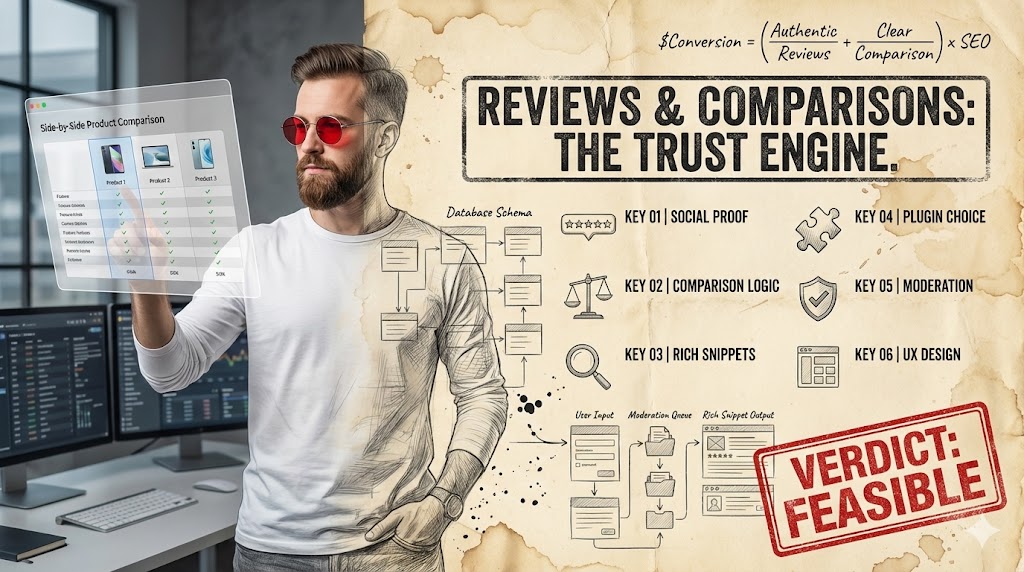
Depending on your goals and your willingness to maintain it
Implementing review and product comparison features in WordPress is absolutely feasible and highly beneficial for e-commerce sites, affiliate marketers, and content creators who need structured product reviews—but it does require careful planning and solid plugin management.
- Boosts credibility and increases conversions through authentic user feedback.
-
Requires choosing the right plugin and ongoing maintenance to avoid conflicts.
-
Ideal for affiliate websites that compare gadgets or services in detail.
Understanding the Need: Why Reviews and Comparisons Matter
In today’s digital marketplace, consumers rely heavily on the experiences and opinions of others before making a purchase. Integrating robust review and product comparison features into your WordPress site is no longer a luxury but a fundamental requirement for building trust and driving sales. These functionalities transform your website from a static catalog into a dynamic, interactive platform.
The strategic inclusion of user-generated content and clear comparison tools significantly impacts your audience’s purchase decisions. It provides them with the necessary information to feel confident in their choices, reducing buyer’s remorse and fostering a loyal customer base. Ignoring these elements can leave your audience seeking information elsewhere, potentially losing them to competitors.
- Builds Credibility: Authentic reviews act as powerful social proof, validating your products or recommendations.
- Boosts SEO: Rich snippets from review schema can improve search engine visibility and click-through rates.
- Drives Conversions: Clear comparisons help users quickly identify the best fit, accelerating their decision-making process.
- Gathers Feedback: Reviews provide invaluable insights into product performance and customer satisfaction.
Choosing the Right WordPress Plugin: A Critical First Step
The WordPress plugin ecosystem offers a vast array of options for adding review and comparison functionalities, making the selection process daunting. Your choice will significantly impact your site’s performance, scalability, and the overall user experience. It’s crucial to evaluate plugins not just on their advertised features but also on their compatibility with your existing theme and other plugins.
A common mistake is to pick the first plugin that seems to fit, without considering long-term implications like developer support or potential conflicts. Prioritizing a plugin with a strong track record and regular updates ensures greater stability and security for your website. This foundational decision underpins the success of your entire review and comparison system.
- Feature Set: Ensure it offers all necessary review types (star ratings, pros/cons, comments) and comparison layouts.
- Compatibility: Verify it works seamlessly with your WordPress theme and other essential plugins, especially e-commerce solutions.
- Performance Impact: Choose lightweight plugins to avoid slowing down your site, which can negatively affect SEO and UX.
- Developer Support: Look for active development and responsive support channels for troubleshooting and updates.
- Ease of Use: A user-friendly interface for both administrators and front-end users is paramount for adoption.
Essential Features for Product Review Systems
A comprehensive product review system goes beyond simple star ratings, offering multiple avenues for users to express their opinions and experiences. The goal is to capture detailed, actionable feedback that benefits both potential buyers and your product strategy. Implementing a robust system encourages more users to contribute, enriching your content and enhancing your site’s authority.
Key features should facilitate easy submission while ensuring the quality and authenticity of the feedback. This includes mechanisms for moderation and the presentation of reviews in an easily digestible format. The effective display of user-generated content is critical for leveraging social proof and guiding new visitors.
- Star Rating System: Allows users to quickly rate products on a scale (e.g., 1-5 stars).
- Textual Comments: Provides space for detailed written feedback, including pros and cons.
- Review Moderation: Enables administrators to approve, edit, or delete reviews to maintain quality and prevent spam.
- Image/Video Uploads: Allows users to submit media with their reviews, enhancing authenticity.
- Helpful/Unhelpful Buttons: Empowers users to rate the usefulness of other reviews, highlighting valuable insights.
- Structured Data Markup: Automatically generates schema markup for reviews, improving search engine visibility.
Insight
Always ensure your review plugin automatically generates valid Schema.org markup for reviews. This is crucial for obtaining rich snippets in search results, making your listings stand out and potentially increasing click-through rates.
Implementing Product Comparison Tables: Core Functionality
Product comparison tables are indispensable tools for guiding users through complex purchasing decisions, especially when multiple similar products are available. They allow visitors to quickly assess the differences and similarities between items, highlighting key features, specifications, and pricing in a clear, side-by-side format. This functionality directly addresses comparison paralysis by simplifying the decision-making process.
Effective comparison tables are highly customizable, enabling you to define which attributes are most relevant to your audience. They should be intuitive to navigate and visually appealing, ensuring a positive user experience. A well-designed comparison table can significantly reduce bounce rates and increase the time users spend engaging with your content.
- Side-by-Side Display: Presents product features in parallel columns for easy comparison.
- Customizable Fields: Allows you to define specific attributes (e.g., price, specifications, features) for comparison.
- Filtering and Sorting: Enables users to narrow down options based on their preferences.
- Highlighting Differences: Visually emphasizes key distinctions between products.
- Call-to-Action Buttons: Integrates direct links to product pages or purchase options within the table.
Myth
Product comparison tables are only useful for affiliate marketing websites.
Reality
While popular with affiliate marketers, comparison tables are equally valuable for e-commerce stores to help customers differentiate between their own product variations, for content sites reviewing services, or for any business needing to present complex choices clearly. They enhance internal product differentiation and aid customer decision-making.
Step-by-Step Setup: Installing and Configuring Your Chosen Plugin
Once you’ve selected the ideal review and comparison plugin, the next phase involves its installation and initial configuration. This process typically follows standard WordPress plugin procedures but requires attention to detail to ensure all features are correctly activated and integrated with your site’s content. A methodical approach prevents common setup errors and ensures a smooth launch.
The initial configuration often involves setting global parameters for reviews, such as moderation settings, display options, and integration with specific post types. For comparison features, you’ll usually define the fields that can be compared and how tables are generated. Taking the time to explore every setting ensures you leverage the plugin’s full potential.
- Install the Plugin: Navigate to ‘Plugins’ > ‘Add New’ in your WordPress dashboard, search for your chosen plugin, and click ‘Install Now’.
- Activate the Plugin: After installation, click ‘Activate’ to enable its functionalities on your site.
- Access Plugin Settings: Locate the plugin’s dedicated settings page, usually found under ‘Settings’ or a new menu item in your dashboard.
- Configure Global Review Settings: Define default star ratings, comment fields, and moderation preferences.
- Set Up Comparison Fields: Specify the product attributes that will be available for comparison tables.
- Integrate with Post Types: Ensure the plugin is enabled for the specific post types (e.g., ‘products’, ‘posts’) where you want reviews or comparisons to appear.
Integrating with WooCommerce for E-commerce Reviews
For WordPress sites running an online store with WooCommerce, seamless integration of review and comparison functionalities is paramount. While WooCommerce has a basic review system built-in, dedicated plugins often offer more advanced features, better display options, and enhanced SEO capabilities. The goal is to augment WooCommerce’s native capabilities without creating conflicts.
A well-integrated plugin will automatically pull product data from WooCommerce, allowing customers to leave reviews directly on product pages and facilitating the creation of dynamic comparison tables using existing product attributes. This deep WooCommerce integration ensures consistency and reduces manual data entry, streamlining your e-commerce operations and improving the customer journey.
- Product Page Integration: Ensure reviews can be submitted and displayed directly on individual WooCommerce product pages.
- Rating Synchronization: Verify that star ratings from your chosen plugin sync with WooCommerce’s product rating system.
- Attribute Mapping: Map WooCommerce product attributes to your comparison plugin’s fields for accurate side-by-side displays.
- Review Submission Forms: Customize the review submission form to capture specific feedback relevant to your products.
- User Account Integration: Allow logged-in users to manage their reviews and view past contributions.
The Gadget Guru’s Conversion Leap
The Trap An affiliate site reviewing electronics struggled with low conversion rates despite high traffic. Their basic review system lacked detailed pros/cons and a clear way for users to compare multiple products side-by-side, leading visitors to leave for competitor sites to finalize their decisions.
The Win By implementing a robust review plugin with advanced comparison tables seamlessly integrated with WooCommerce (for their direct sales products), they saw a 35% increase in affiliate clicks and a 20% boost in direct product sales within three months. The detailed comparisons and structured reviews provided the confidence users needed to make immediate decisions on their site.
Optimizing for SEO and User Experience (UX)
Beyond functionality, the success of your review and comparison system hinges on its optimization for both search engines and human users. A system that is difficult to navigate or fails to appear prominently in search results will not achieve its full potential. Prioritizing SEO and UX ensures your valuable content reaches the widest possible audience and provides a frictionless experience.
Key optimization strategies include ensuring your reviews generate rich snippets in search results, making your site more appealing to click. Furthermore, the design and responsiveness of your comparison tables and review sections must cater to all devices, particularly mobile users. A poor mobile experience can quickly deter potential customers and negatively impact your search rankings.
- Schema Markup: Confirm that your plugin correctly implements Schema.org markup for reviews and product data to gain rich snippets.
- Mobile Responsiveness: Ensure all review forms, displays, and comparison tables are fully functional and visually appealing on all screen sizes.
- Page Load Speed: Choose plugins that are optimized for performance to prevent slow loading times, which hurt both SEO and UX.
- Clear Navigation: Make it easy for users to find review sections and comparison tools on product pages.
- Review Moderation: Actively moderate reviews to maintain quality, remove spam, and ensure helpful, relevant content.
Insight
Implement a clear and consistent review moderation policy from day one. Unmoderated reviews can quickly devolve into spam or unhelpful content, eroding trust and potentially harming your brand reputation. Automatic spam filters are a good start, but human oversight is irreplaceable for quality control.
Common Pitfalls and Troubleshooting Review & Compare Systems
Even with careful planning, implementing review and product comparison features can encounter challenges. Understanding common pitfalls and knowing how to troubleshoot them is essential for maintaining a smooth and effective system. Proactive monitoring and a systematic approach to problem-solving can prevent minor issues from escalating into significant disruptions.
One of the most frequent issues is plugin conflicts, where two or more plugins interfere with each other’s functionality, leading to unexpected errors or broken features. Other challenges include performance degradation due to poorly coded plugins or a sudden influx of spam reviews. Addressing these issues promptly is crucial for preserving your site’s integrity and user trust.
- Plugin Conflicts: Deactivate plugins one by one to identify the culprit if you experience unexpected errors or broken features.
- Performance Issues: Use caching plugins and optimize images to mitigate slowdowns caused by resource-intensive review/comparison features.
- Spam Reviews: Implement CAPTCHA, honeypots, or dedicated anti-spam plugins to combat unsolicited or fake submissions.
- Theme Incompatibility: If styling looks off, use custom CSS to adjust the appearance of review or comparison elements to match your theme.
- Data Loss: Regularly back up your WordPress site, especially before making significant changes or plugin updates, to prevent review data loss.
Advanced Customization and Scaling Your System
As your website grows and your audience’s needs evolve, you may find the need to move beyond the out-of-the-box functionalities of your chosen plugin. Advanced customization allows you to tailor the appearance and behavior of your review and comparison features to perfectly align with your brand and specific business requirements. This level of control ensures a unique and highly optimized user experience.
Scaling your system involves not only handling increased traffic and data but also integrating with other platforms or services. This might include connecting to external review platforms or leveraging APIs for more complex data synchronization. Focusing on performance optimization and modular design will ensure your system remains robust and responsive as it expands.
- Custom CSS/Templates: Modify the visual appearance of review forms, displays, and comparison tables to match your brand’s aesthetic.
- API Integration: Connect with third-party review platforms or data sources for enhanced functionality or data aggregation.
- Caching Solutions: Implement robust caching (e.g., server-level, object caching) to handle increased traffic to review and comparison pages.
- Custom Fields: Add unique fields to your review forms to capture highly specific product feedback.
- User Roles and Permissions: Define who can submit, moderate, or manage reviews and comparisons.
Top WordPress Plugins for Reviews and Product Comparison
Recommended Tools for WordPress Reviews & Comparisons
Context: Selecting the right plugin is crucial for success. These tools offer varying levels of features, ease of use, and integration capabilities, catering to different needs from basic reviews to complex comparison tables.
- WP Product Review Lite – Positionierung: Excellent for beginners and those needing basic review functionality. Konkreter Nutzen: Allows star ratings, pros/cons, and review boxes with affiliate links directly in posts.
- Ultimate Product Review – Positionierung: A more feature-rich option for detailed reviews and comparison tables. Konkreter Nutzen: Provides advanced review criteria, user reviews, and customizable comparison tables with multiple fields.
- Schema & Structured Data for WP & AMP – Positionierung: While not solely a review plugin, it excels at generating rich snippets for existing review data. Konkreter Nutzen: Ensures your review data is correctly formatted for search engines, boosting visibility for any review system.
- TablePress – Positionierung: A powerful, flexible plugin for creating custom comparison tables manually. Konkreter Nutzen: Allows you to build highly customized tables for product comparisons, though it requires manual data entry.
Entscheidungshilfe: Choose based on your required feature depth and technical comfort. If you need simple, quick reviews, WP Product Review Lite is ideal. For comprehensive comparison tables and advanced review features, Ultimate Product Review is a strong contender. If your primary concern is SEO for existing review data, Schema & Structured Data is key. For ultimate control over table design, TablePress is unmatched but demands more effort. However, if your needs involve highly dynamic, multi-vendor marketplace comparison logic that requires real-time API calls and complex algorithms, none of these plugins will be sufficient, necessitating custom development.
Action Checklist: Implementing Reviews and Comparisons
- Select Your Plugin: Research and irrevocably choose a primary review/comparison plugin that aligns with your site’s needs and budget.
- Install and Activate: Install the chosen plugin(s) from the WordPress repository and activate them.
- Configure Basic Settings: Navigate to the plugin settings and establish global defaults for reviews (e.g., moderation, display).
- Define Comparison Fields: Specify the key attributes for your product comparison tables.
- Test Review Submission: Submit a test review on a product or post to ensure the system functions correctly.
- Create First Comparison Table: Build and publish your initial product comparison table.
- Verify Schema Markup: Use Google’s Rich Results Test to confirm your review schema is valid.
- Set Up Moderation: Implement a clear strategy for managing and approving incoming reviews.
- Monitor for Conflicts: Regularly check your site for any plugin conflicts or performance issues.
Can I use multiple review plugins on my WordPress site?
It’s generally not recommended to use multiple plugins that provide the exact same core functionality (e.g., two different star rating systems). This can lead to conflicts, performance issues, and confusion regarding which plugin is generating the schema markup. However, you can combine a dedicated review plugin with a separate comparison table plugin if their functionalities are distinct and well-integrated.
How do I prevent spam reviews on my WordPress site?
Preventing spam reviews requires a multi-faceted approach. You should enable comment moderation in WordPress settings, use a CAPTCHA or reCAPTCHA on your review forms, implement a honeypot field, and consider using anti-spam plugins like Akismet or dedicated review spam filters. Requiring users to be logged in to leave a review can also significantly reduce spam.
Are product comparison tables good for SEO?
Yes, product comparison tables can be excellent for SEO. They provide highly valuable, structured content that directly answers user queries for product comparisons, which often have high commercial intent. When designed well, they can increase time on page, reduce bounce rates, and attract long-tail keywords. Ensuring your tables are mobile-friendly and load quickly further enhances their SEO value.
What should I do if my theme conflicts with the review or comparison plugin?
If you encounter a theme conflict, first check the plugin’s documentation for known issues or compatibility notes. Try switching to a default WordPress theme (like Twenty Twenty-Four) temporarily to confirm the conflict is indeed with your theme. If it is, contact the plugin’s support team or your theme developer. Often, minor CSS adjustments or a small code snippet provided by support can resolve the issue without needing to change themes.






