


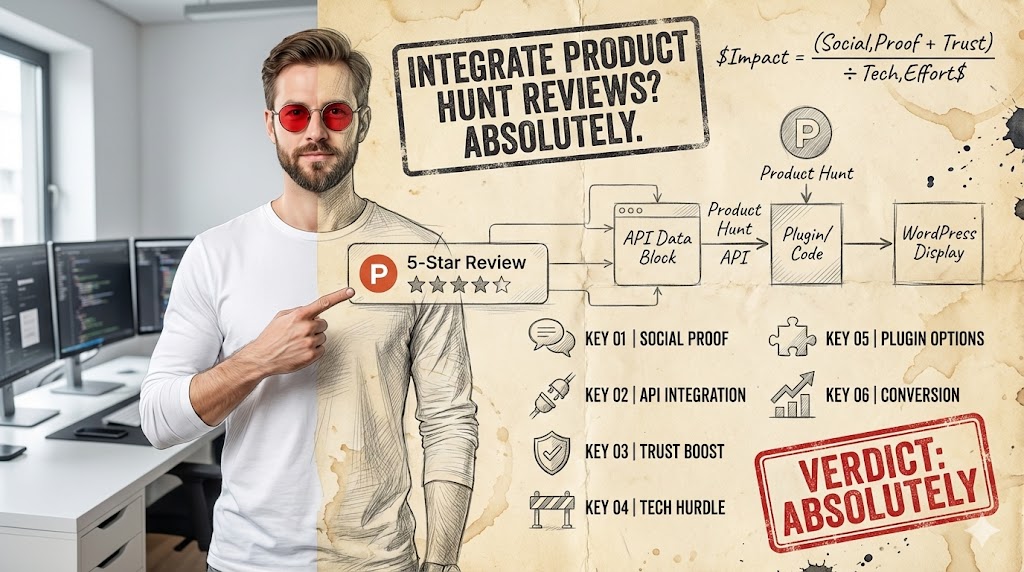
Integrate Product Hunt Reviews? Absolutely.
YES, integrate Product Hunt reviews. This strategy is highly effective for leveraging social proof and enhancing your product’s credibility on WordPress.
- Instantly boosts your website’s social proof with validation from a respected tech community.
- Requires careful setup, either through plugins or custom code, which can be a technical hurdle for some.
- Ideal for product landing pages or dedicated ‘social proof’ sections to showcase early adopter enthusiasm.
Integrating Product Hunt reviews into your WordPress site is a powerful way to display authentic user validation. Many product creators face initial skepticism, and showcasing reviews from a platform like Product Hunt can significantly reduce this hesitation. This process transforms raw feedback into a compelling marketing asset, directly on your website.
The primary goal is to bridge the gap between your product’s presence on Product Hunt and your own digital storefront. By doing so, you provide immediate evidence of your product’s value and community acceptance. This step-by-step guide will navigate the methods, tools, and best practices to ensure a seamless integration, helping you convert visitors into confident users.
Why Integrate Product Hunt Reviews?
Displaying Product Hunt reviews directly on your WordPress site offers significant advantages, primarily by enhancing trust and credibility. Visitors are more likely to engage with a product that already has positive external validation. This social proof acts as a powerful endorsement, influencing purchasing decisions and user adoption rates.
Beyond mere display, these reviews provide valuable insights into user perception and product strengths. They can highlight features that resonate most with early adopters, guiding future development and marketing efforts. Leveraging this feedback loop is crucial for sustained growth and maintaining a competitive edge in the market.
- Boosts Conversion Rates: Visible positive reviews can significantly increase the likelihood of visitors taking desired actions, such as signing up or making a purchase.
- Enhances SEO: Fresh, relevant content from reviews can improve your site’s search engine ranking, making it more discoverable.
- Builds Brand Authority: Showcasing endorsements from a respected platform like Product Hunt positions your brand as a credible and innovative player.
Insight
Don’t just display reviews; integrate them strategically near calls-to-action or on dedicated ‘Why Choose Us’ pages to maximize their persuasive power.
Understanding Product Hunt’s Review System
Product Hunt’s review system is designed to provide genuine feedback from its community of tech enthusiasts and early adopters. Unlike general review platforms, Product Hunt reviews often come from users who are deeply interested in new technologies and products. This makes their feedback particularly valuable and credible for tech-focused businesses.
The platform encourages detailed, constructive reviews, often highlighting specific features, user experiences, and overall value. Understanding the structure and typical content of these reviews is essential for effective integration. You’ll want to ensure that the displayed reviews maintain their original context and authenticity, reflecting the quality of feedback found on Product Hunt itself.
- Verified User Base: Reviews typically come from registered Product Hunt users, lending them higher credibility than anonymous feedback.
- Focus on Innovation: Reviewers often evaluate products based on their novelty, utility, and problem-solving capabilities.
- Structured Feedback: While free-form, many reviews naturally cover aspects like ease of use, feature set, and overall satisfaction.
Choosing Your Integration Method: Plugins vs. Custom Code
When bringing Product Hunt reviews to WordPress, you essentially have two main paths: using a dedicated plugin or implementing custom code. Each method has its own set of advantages and challenges, making the choice dependent on your technical comfort level, budget, and specific requirements. Understanding these differences is crucial for a successful integration.
Plugins offer a more streamlined, user-friendly approach, often requiring minimal technical expertise. Custom code, while more complex, provides unparalleled flexibility and control over the display and functionality. Your decision here will significantly impact the setup time, ongoing maintenance, and the ultimate appearance of your reviews.
- WordPress Plugins: Generally easier to set up, often with pre-built templates and shortcodes, ideal for users without coding knowledge.
- Custom Code (API Integration): Offers maximum customization, allowing for unique designs and advanced filtering, best for developers or those with specific design needs.
- Hybrid Approaches: Sometimes, a plugin might provide a base, which can then be extended or styled with minor custom CSS or JavaScript.
Myth
Product Hunt reviews are only useful for the launch phase.
Reality
Product Hunt reviews provide ongoing social proof and valuable user feedback long after launch. Integrating them continuously reinforces your product’s value and community acceptance, serving as a dynamic testimonial engine.
Option 1: Using a Dedicated WordPress Plugin
For most WordPress users, leveraging a dedicated plugin is the most straightforward and efficient way to integrate Product Hunt reviews. These plugins are designed to handle the complexities of API communication and data display, abstracting away the need for manual coding. They often come with intuitive interfaces and pre-designed templates, allowing for quick setup.
The primary benefit of a plugin is its ease of use. You can typically install, activate, and configure it within minutes, without ever touching a line of code. However, it’s important to choose a reputable plugin that is regularly updated and offers the specific features you need, such as moderation, styling options, and responsive design. Always check compatibility with your current WordPress version and other plugins.
- Ease of Installation: Most plugins can be installed directly from the WordPress dashboard with a few clicks.
- Pre-built Display Options: Often include various layouts (e.g., carousel, grid, list) to showcase reviews aesthetically.
- No Coding Required: Ideal for non-developers, as all interactions are typically handled through a graphical user interface.
Recommended WordPress Plugins for Product Hunt Reviews
Context: These tools simplify the integration process, offering varying levels of customization and ease of use for displaying Product Hunt reviews.
- Product Hunt Reviews for WordPress – A dedicated plugin, if available and well-maintained, would be the most direct solution, often providing specific API integration and display options.
- General Review Display Plugins – Plugins like ‘WP Review Pro’ or ‘Site Reviews’ might offer custom source options or API integration capabilities that could be adapted for Product Hunt, though this requires more configuration.
- Custom Feed/Widget Builders – Tools like ‘Smash Balloon Custom Feeds’ (if they support Product Hunt as a source) or ‘Essential Grid’ could be configured to pull and display content, offering more design flexibility but also more setup complexity.
Decision Aid: Choose a dedicated Product Hunt plugin for simplicity and direct integration. Opt for general review or feed builders if you need advanced styling and are comfortable with more complex setup, or if a direct PH plugin isn’t actively maintained. Avoid any tool that requires manual data entry for each review, as this defeats the purpose of dynamic integration.
Step-by-Step: Installing and Configuring a Plugin
Once you’ve selected a suitable plugin, the installation and configuration process is generally straightforward. This section outlines the typical steps involved, ensuring you can get your Product Hunt reviews live on your site with minimal fuss. Pay close attention to API key requirements and display settings to achieve the desired outcome.
The critical part often lies in obtaining and correctly entering the Product Hunt API key. This key grants your plugin permission to fetch review data. Without it, the integration cannot proceed. After successful API connection, focus on customizing the display to match your website’s aesthetic and ensure optimal readability for your visitors.
- Install the Plugin: Navigate to ‘Plugins’ > ‘Add New’ in your WordPress dashboard, search for your chosen plugin, and click ‘Install Now’ then ‘Activate’.
- Obtain Product Hunt API Key: Visit the Product Hunt developer portal, register your application, and generate the necessary API credentials (Client ID, Client Secret).
- Configure Plugin Settings: Go to the plugin’s settings page, enter your Product Hunt API key, and customize display options such as layout, number of reviews, and styling.
Option 2: Manual Integration via Product Hunt API
For those with development skills or a need for highly customized display, integrating Product Hunt reviews directly via their API is a powerful alternative. This method offers complete control over how reviews are fetched, filtered, styled, and presented on your WordPress site. It bypasses the limitations of plugins, allowing for unique design and functionality tailored precisely to your brand.
The process involves making HTTP requests to the Product Hunt API, parsing the JSON response, and then rendering the data using PHP, HTML, CSS, and potentially JavaScript. While more complex, it ensures that your review display is perfectly aligned with your site’s design system and performance requirements. This approach is ideal for developers seeking maximum flexibility and optimization.
- API Key Generation: Register your application on Product Hunt’s developer portal to obtain your Client ID and Client Secret.
- Data Fetching: Use PHP (e.g.,
wp_remote_get()) to make authenticated requests to the Product Hunt API endpoints for reviews. - Data Parsing and Display: Process the JSON response, extract relevant review data, and dynamically generate HTML to display the reviews on your WordPress pages or posts.
Case Study: The SaaS Startup’s Custom Display
The Trap: A growing SaaS startup initially used a generic review plugin, but its rigid design didn’t match their sleek, modern branding. The reviews felt tacked on, diminishing their impact.
The Win: They invested in a custom API integration. Their development team built a bespoke carousel that seamlessly blended with their UI, allowing for custom filtering (e.g., ‘most helpful’ reviews) and dynamic updates. This led to a 15% increase in engagement with their ‘Social Proof’ section and improved perceived professionalism.
Displaying Reviews Effectively on Your Site
Simply integrating reviews isn’t enough; how you display them significantly impacts their effectiveness. The goal is to make them easily discoverable, readable, and visually appealing. Strategic placement and thoughtful design can amplify the impact of your Product Hunt social proof, turning casual visitors into engaged users. Consider the user journey and where reviews would be most persuasive.
Effective display involves more than just dumping text onto a page. Think about elements like review carousels, dedicated testimonial sections, or even integrating snippets directly into relevant product feature descriptions. Ensure that the design is responsive, looking great on all devices, and that the reviews are easily digestible, perhaps highlighting key phrases or reviewer names.
- Strategic Placement: Place reviews near product descriptions, pricing tables, or on a dedicated ‘Testimonials’ page.
- Visual Appeal: Use clean layouts, legible fonts, and consider adding reviewer avatars or product upvote counts for authenticity.
- Highlight Key Information: Emphasize positive sentiments or specific features mentioned in the reviews using bold text or distinct styling.
Insight
Don’t be afraid to curate! While authenticity is key, you can choose to highlight your strongest, most relevant reviews first, especially on critical conversion pages.
Maintaining and Updating Your Product Hunt Reviews
Integrating Product Hunt reviews isn’t a one-time task; it requires ongoing maintenance to ensure accuracy and freshness. Product Hunt is a dynamic platform, and new reviews can appear regularly. Keeping your displayed reviews up-to-date ensures that your website always presents the most current and relevant social proof, reflecting your product’s ongoing evolution and community reception.
Regular maintenance also involves monitoring for any API changes or plugin updates that might affect your integration. Outdated information or broken displays can undermine credibility. Establishing a routine for checking and refreshing your reviews is a small effort that yields significant returns in maintaining trust and showcasing continuous validation.
- Scheduled Updates: Configure your plugin or custom script to fetch new reviews periodically (e.g., daily or weekly) to keep content fresh.
- API Key Monitoring: Keep an eye on your Product Hunt developer account for any notifications regarding API key expiration or changes.
- Review Moderation: While Product Hunt handles moderation, you might want to filter or highlight specific reviews on your site for strategic reasons.
Common Pitfalls and How to Avoid Them
While integrating Product Hunt reviews can be highly beneficial, several common pitfalls can derail your efforts or diminish their impact. Awareness of these potential issues allows you to proactively implement solutions, ensuring a smooth and effective integration. Avoiding these mistakes is crucial for maintaining credibility and maximizing the value of your social proof.
One significant challenge is dealing with negative or less-than-stellar reviews. While transparency is important, you also need to manage how these are presented. Another pitfall involves performance issues, where poorly optimized integrations can slow down your website. Addressing these concerns upfront will save you headaches down the line and ensure a positive user experience.
- Ignoring Negative Reviews: While you can highlight positive ones, completely omitting all critical feedback can appear disingenuous. Consider a balanced approach or addressing concerns directly.
- Performance Issues: Overloading your site with too many dynamic API calls or unoptimized review displays can slow down page load times. Implement caching mechanisms.
- Outdated Content: Failing to refresh reviews means visitors see old feedback, which might not reflect your current product state. Ensure automated updates are in place.
Maximizing the Impact of Your Product Hunt Social Proof
To truly leverage Product Hunt reviews, you need to think beyond simple display. Maximizing their impact involves strategic positioning, thoughtful design, and integrating them into your broader marketing narrative. This approach transforms reviews from static text into dynamic tools that actively contribute to your business goals, such as increasing conversions or building a stronger brand.
Consider how reviews can tell a story about your product’s journey and user satisfaction. Use them to address potential customer objections or highlight unique selling propositions. Integrating reviews with other marketing elements, like case studies or user testimonials, creates a comprehensive picture of your product’s value, reinforcing trust and encouraging engagement.
- Integrate with Landing Pages: Place compelling reviews directly on landing pages to immediately build trust with new visitors.
- Create a ‘Wall of Love’: Dedicate a specific page to showcase a collection of your best reviews, allowing visitors to explore user sentiment in depth.
- Use in Marketing Materials: Quote snippets of powerful reviews in emails, social media posts, or ad campaigns to add third-party validation.
Alternatives to Direct Product Hunt Integration
While direct integration of Product Hunt reviews is powerful, it’s not the only way to leverage social proof. Depending on your resources, technical capabilities, or specific goals, alternative strategies might be more suitable. These options can still help you showcase user validation, even if they don’t involve a live feed from Product Hunt.
These alternatives range from manually curating testimonials to using broader review aggregation platforms. Each method has its own trade-offs in terms of effort, authenticity, and dynamic updates. Understanding these options allows you to choose the best approach for your specific context, ensuring you still benefit from the power of social proof.
- Manual Testimonials: Collect screenshots or direct quotes from Product Hunt, then manually add them to your WordPress site as static testimonials. This offers full control but lacks dynamic updates.
- General Review Aggregators: Use platforms that pull reviews from multiple sources (e.g., G2, Capterra, Trustpilot) and integrate them into WordPress. Product Hunt might be one of many sources.
- Link Directly to Product Hunt: While not an integration, a prominent ‘See our reviews on Product Hunt’ button can direct users to the source, maintaining full authenticity without on-site display.
Action Checklist: Integrating Product Hunt Reviews
- Define Your Goal: Clearly identify where and why you want to display reviews (e.g., landing page, dedicated section) to inform your method choice.
- Choose Your Method: Decide between a WordPress plugin (easier, less control) or custom API integration (more complex, full control).
- Obtain API Credentials: Register your application on Product Hunt’s developer portal to secure your Client ID and Client Secret.
- Install/Develop Integration: Install your chosen plugin and configure it with API keys, or begin developing your custom script.
- Design Display Layout: Customize the visual presentation of reviews to match your site’s branding and ensure readability.
- Implement Caching: For custom integrations, set up caching to prevent excessive API calls and improve site performance.
- Schedule Updates: Configure automatic review fetching to keep your content fresh and relevant.
- Monitor Performance: Regularly check your site’s loading speed and review display for any issues.
- Review and Refine: Periodically assess the impact of the reviews on user engagement and make adjustments as needed.
Frequently Asked Questions About Product Hunt Review Integration
Can I filter which Product Hunt reviews are displayed?
Yes, depending on your chosen method. Plugins often provide options to filter by rating or keywords. With custom API integration, you have complete control over filtering and displaying specific reviews based on your criteria.
Is it safe to use Product Hunt’s API on my WordPress site?
Yes, using Product Hunt’s API is safe, provided you follow their developer guidelines and secure your API keys. Ensure your WordPress site has proper security measures in place to protect sensitive information.
Will integrating reviews slow down my WordPress site?
It can, if not implemented correctly. To prevent slowdowns, use a well-optimized plugin, implement caching for API calls, and ensure your custom code is efficient. Displaying too many reviews at once without pagination can also impact performance.
What if my product has negative reviews on Product Hunt?
Transparency is valuable. While you can highlight positive reviews, consider displaying a balanced view or addressing common criticisms directly on your site. Completely hiding all negative feedback can undermine trust. Some integrations allow you to set a minimum rating for displayed reviews.
Do I need coding knowledge to integrate Product Hunt reviews?
Not necessarily. If you use a dedicated WordPress plugin, you typically won’t need coding knowledge. However, if you opt for manual integration via the Product Hunt API, a good understanding of PHP, HTML, CSS, and API interactions is required.






