


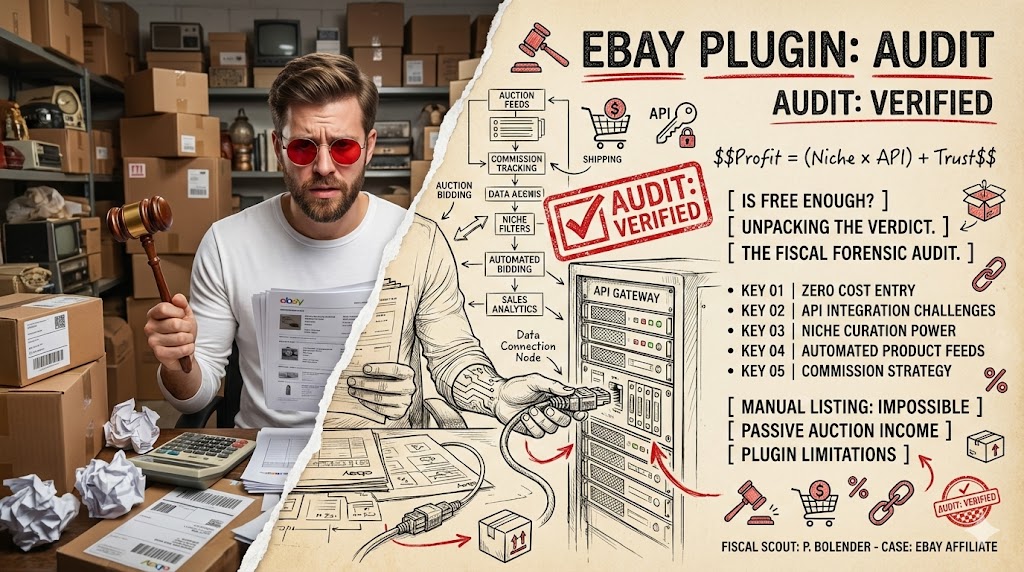
Navigating Free eBay Affiliate Plugins: A Practical Verdict
Depends. Free eBay affiliate WordPress plugins are suitable for specific use cases but come with inherent limitations. They serve as an excellent starting point for beginners or those testing new niches.
- Offers a cost-effective entry point into eBay affiliate marketing without upfront plugin expenses.
- Often comes with limited features, potential for broken links, and minimal developer support.
- Ideal for building a dedicated product review blog focused on specific, curated eBay categories.
What are Free eBay Affiliate WordPress Plugins?
Free eBay affiliate WordPress plugins are specialized tools designed to help website owners integrate eBay product listings directly into their WordPress sites. These plugins act as a bridge, allowing you to display items from eBay and earn commissions when visitors click through your unique affiliate links and make a purchase. They simplify the process of connecting with the eBay Partner Network, removing the need for complex coding.
The primary appeal of these plugins lies in their zero cost, making them accessible for new affiliate marketers or those with limited budgets. They aim to streamline the content creation process by automating product data retrieval and link generation. However, their ‘free’ nature often implies a trade-off in terms of advanced features, customization options, and dedicated support.
- Cost-Effectiveness: No direct financial investment for the plugin itself.
- Ease of Use: Generally offer a user-friendly interface for basic setup.
- Integration: Connects your WordPress site to the eBay product catalog.
- Automation: Helps in generating product displays and affiliate links efficiently.
Strengths of Free eBay Affiliate Plugins
- Provides a low barrier to entry for new affiliate marketers.
- Allows for quick basic setup and initial product display.
- Offers a valuable learning experience in affiliate marketing mechanics.
Limitations of Free eBay Affiliate Plugins
- Often comes with limited customization and design options.
- Can lead to potential issues like broken affiliate links if not maintained.
- Typically offers minimal or no dedicated developer support.
How Do Free eBay Affiliate Plugins Work?
Free eBay affiliate plugins function by leveraging the eBay API (Application Programming Interface) to communicate directly with eBay’s vast product database. Once installed and configured with your unique API keys, the plugin can perform searches, retrieve product information, and generate dynamic content for your website. This process allows for the display of real-time product data, including images, titles, prices, and direct links to eBay listings.
When a visitor clicks on an eBay product displayed through your plugin, they are redirected to eBay via your specific affiliate tracking link. A tracking cookie is then placed on their browser, attributing any subsequent purchases within a set timeframe back to your affiliate account. This mechanism ensures you receive a commission for eligible sales, making the plugin a crucial component in the affiliate sales funnel.
- API Connection: Establishes a link between your site and eBay’s product data.
- Product Search: Allows you to search for specific items or categories on eBay.
- Dynamic Display: Automatically updates product information like price and availability.
- Affiliate Link Generation: Embeds your unique tracking ID into all outbound links.
- Cookie Tracking: Ensures commissions are attributed correctly after a click.
Insider tip
Always use a staging environment for testing new plugins or major configuration changes to avoid potential downtime or issues on your live website.
Choosing the Right Free Plugin for Your Needs
Selecting the appropriate free eBay affiliate plugin requires careful consideration, as not all options offer the same level of functionality or reliability. It is crucial to evaluate the plugin’s reputation, its last update date, and the overall quality of its feature set. An outdated plugin can lead to security vulnerabilities or compatibility issues with newer WordPress versions and themes.
Look for plugins that have a strong user base and positive reviews, indicating active development and community support. Prioritize plugins that clearly outline their API compatibility and offer flexible display options. Understanding these factors upfront can save significant time and effort in the long run, ensuring your affiliate efforts are built on a stable foundation.
- Active Development: Check when the plugin was last updated to ensure compatibility and security.
- Feature Set: Evaluate if it offers essential functions like product search, customizable display, and shortcodes.
- User Reviews: Read feedback from other users to gauge reliability and common issues.
- Support Community: Look for an active forum or documentation, even if direct support is limited.
- API Compatibility: Confirm it supports the current eBay API versions for seamless operation.
Myth
Free plugins are always unreliable and insecure, making them a risky choice for affiliate marketing.
Reality
Many free plugins are well-maintained and secure, especially those with a large user base and regular updates. The key is careful vetting and consistent monitoring for security patches and compatibility.
Step-by-Step Installation of a Free eBay Plugin
Installing a free eBay affiliate plugin follows the standard WordPress plugin installation procedure, making it accessible even for beginners. The process typically involves searching the official WordPress plugin directory from your dashboard, installing the chosen plugin, and then activating it. This initial setup is straightforward, but careful attention to detail ensures a smooth start to your affiliate journey.
After activation, most plugins will guide you through an initial setup wizard or prompt you to navigate to their settings page. This is where you will begin configuring the plugin to connect with your eBay Partner Network account. Ensuring your WordPress installation is up-to-date before installing any new plugin can prevent common compatibility conflicts.
- Access Dashboard: Log into your WordPress admin dashboard.
- Navigate to Plugins: Go to ‘Plugins’ > ‘Add New’.
- Search for Plugin: Use the search bar to find your desired free eBay affiliate plugin.
- Install Plugin: Click ‘Install Now’ and wait for the process to complete.
- Activate Plugin: Click ‘Activate’ to enable the plugin on your site.
- Initial Setup: Follow any on-screen prompts for basic configuration.
Configuring Your Free Plugin for eBay API Integration
Once your free eBay affiliate plugin is installed and activated, the next critical step is to configure its settings for eBay API integration. This involves obtaining specific credentials from the eBay Developer Program and inputting them into your plugin’s configuration panel. Without these API keys, your plugin cannot communicate with eBay’s servers to fetch product data or generate affiliate links.
The process typically starts with registering for an eBay Developer Program account, which is separate from your eBay Partner Network account. You will then generate a set of unique API keys, including an App ID, Cert ID, and Dev ID. Carefully copy and paste these credentials into the designated fields within your plugin’s settings. A successful connection is often indicated by a confirmation message or the ability to search for eBay products directly from your WordPress admin area.
- Register for eBay Developer Program: Create an account to access API tools.
- Generate API Keys: Obtain your unique App ID, Cert ID, and Dev ID.
- Locate Plugin Settings: Find the eBay plugin’s settings page in your WordPress dashboard.
- Input Credentials: Paste your API keys into the respective fields.
- Test Connection: Use the plugin’s built-in test feature to verify successful integration.
- Save Changes: Ensure all configuration settings are saved properly.
Affiliate Revenue Potential
Websites actively engaging in affiliate marketing typically see a 5-15% increase in overall revenue compared to those without, though individual results vary widely based on niche, traffic, and content quality.
Displaying eBay Products on Your WordPress Site
After successfully configuring your free eBay affiliate plugin with the necessary API keys, the next step is to display eBay products on your WordPress site. Most free plugins offer straightforward methods for embedding product listings, primarily through shortcodes or dedicated Gutenberg blocks. These tools allow you to specify search queries, product categories, and display parameters directly within your posts, pages, or widget areas.
The flexibility of these display methods enables you to integrate eBay products seamlessly into your content, whether you are writing a product review, creating a comparison guide, or simply showcasing relevant items. Experiment with different display options to find what best suits your site’s design and user experience. Effective placement and clear calls to action are vital for encouraging clicks and potential conversions.
- Use Shortcodes: Embed specific product listings or search results using simple code snippets.
- Utilize Gutenberg Blocks: If available, use dedicated blocks for visual product integration.
- Widget Integration: Display products in sidebars or footers for persistent visibility.
- Customization Options: Adjust display parameters like number of items, layout, and sorting.
- Content Context: Integrate products naturally within relevant articles and reviews.
Niche Focus Transforms Affiliate Earnings
The trap A new blogger, eager to earn commissions, used a free eBay plugin to embed hundreds of generic products across their site, hoping for broad appeal. They focused on quantity over quality, resulting in very low click-through and conversion rates.
The win After analyzing their audience, they shifted strategy to curate specific, high-value products within a narrow niche (e.g., vintage camera lenses). They then wrote detailed, authentic reviews for each item, explaining benefits and drawbacks. This targeted approach, combined with the free plugin, led to a 300% increase in click-through rates and significantly higher commissions due to improved trust and relevance.
Common Challenges with Free eBay Affiliate Plugins
While free eBay affiliate plugins offer an accessible entry point, users often encounter several common challenges that can impact their effectiveness. One significant issue is the potential for broken links or outdated product information, especially if the plugin is not regularly maintained or if eBay’s API changes. This can lead to a poor user experience and lost commission opportunities.
Another frequent problem involves compatibility conflicts with other WordPress plugins or themes, which can cause site errors, slow loading times, or display issues. Free plugins typically come with limited or no dedicated support, meaning users must rely on community forums or their own troubleshooting skills to resolve problems. Understanding these potential pitfalls upfront helps in managing expectations and preparing for necessary adjustments.
- Outdated Code: Plugins may not keep pace with WordPress or eBay API updates, leading to malfunctions.
- Limited Support: Lack of direct developer assistance for troubleshooting or feature requests.
- Performance Impact: Poorly coded plugins can slow down your website’s loading speed.
- Feature Gaps: Missing advanced functionalities like detailed analytics, advanced filtering, or bulk imports.
- Security Concerns: Unmaintained plugins can become vulnerable to security exploits.
Maximizing Earnings with Free Affiliate Tools
Even with free eBay affiliate plugins, there are effective strategies to maximize your potential earnings. The core principle involves providing genuine value to your audience, which naturally encourages engagement and conversions. Focusing on a specific niche targeting allows you to become an authority in that area, attracting highly motivated buyers who trust your recommendations.
Beyond niche selection, robust SEO optimization for your product review pages and articles is crucial. This ensures your content ranks well in search engines, driving organic traffic to your site. Additionally, crafting compelling content that includes detailed product descriptions, honest pros and cons, and clear calls to action will significantly improve your click-through rates and ultimately, your commissions. Remember, the plugin is a tool; your content is the engine.
- Niche Down: Focus on a specific product category or interest to attract a targeted audience.
- Create Value-Driven Content: Write detailed reviews, comparisons, and guides, not just product listings.
- Optimize for SEO: Use relevant keywords to help your product pages rank higher in search results.
- Strong Calls to Action: Clearly guide users on what to do next (e.g., ‘Check Price on eBay’).
- Regularly Update Content: Keep product information fresh and remove discontinued items.
Insider tip
Focus on providing genuine value and detailed reviews rather than just listing products; this builds trust with your audience and significantly improves conversion rates over time.
When to Consider Upgrading from a Free Solution
While free eBay affiliate plugins are excellent for starting out, there comes a point when their limitations might hinder your growth. Recognizing the signs that you’ve outgrown a free solution is crucial for scaling your affiliate business. Key indicators include a need for greater scalability, more advanced features, or dedicated technical support that free options simply cannot provide. As your website traffic and affiliate revenue grow, the minor inconveniences of a free plugin can become significant bottlenecks.
Consider upgrading when you require more sophisticated customization options, better performance optimization, or detailed analytics beyond what the eBay Partner Network dashboard offers. A premium plugin often provides features like advanced search filters, dynamic content generation, better design integration, and professional support, justifying the investment. This decision should be based on a clear cost-benefit analysis, weighing the plugin’s price against its potential to boost your earnings and streamline your operations.
- Increased Traffic: When your site experiences significant growth, requiring better performance and stability.
- Feature Demand: When you need advanced functionalities like specific filtering, bulk imports, or custom templates.
- Scalability Issues: If the free plugin struggles to handle a large number of products or complex queries.
- Dedicated Support: When you require professional assistance for troubleshooting or new feature implementation.
- Brand Consistency: If the free plugin’s design limitations prevent full brand integration.
Alternatives to Dedicated eBay Affiliate Plugins
While dedicated eBay affiliate plugins offer convenience, they are not the only way to integrate eBay products into your WordPress site. Several alternative approaches can be considered, depending on your technical comfort level and specific needs. One common method is manual linking, where you directly insert affiliate links generated from the eBay Partner Network into your content. This offers maximum control but can be time-consuming for many products.
Another option involves using more general affiliate link management plugins. These tools don’t specifically integrate with eBay’s API but provide a centralized way to cloak, track, and manage all your affiliate links, including those from eBay. For highly technical users or those with unique requirements, custom development offers the ultimate flexibility. This involves hiring a developer to create a bespoke solution tailored exactly to your specifications, though it comes with a significant cost.
- Manual Link Insertion: Directly copy and paste affiliate links from eBay Partner Network into your content.
- General Affiliate Link Managers: Use plugins like Pretty Links or ThirstyAffiliates to cloak and manage all affiliate links.
- Custom Development: Hire a developer to build a tailored solution for specific, advanced needs.
- Content-First Approach: Focus on high-quality content and integrate links naturally without a dedicated display plugin.
- External Tools: Utilize third-party services that generate product feeds which can then be embedded.
Your eBay Affiliate Plugin Setup Checklist
- Register for an eBay Partner Network account and get approved (within 1 day).
- Obtain your eBay Developer Program API keys (App ID, Cert ID, Dev ID) (within 1 day).
- Install and activate your chosen free eBay affiliate plugin on your WordPress site (within 1 hour).
- Input and test your API keys within the plugin settings to ensure a successful connection (within 2 hours).
- Create your first product display or review post, embedding relevant eBay items (within 3 days).
- Monitor initial click-through rates and adjust product selection or content strategy (weekly).
- Back up your entire WordPress site before any major plugin installations or configuration changes (before each change).
Are free eBay affiliate plugins truly free?
Yes, the plugins themselves are free to download and use. However, to earn commissions, you’ll need to join the eBay Partner Network, which is also free to register for.
Can I use multiple free eBay affiliate plugins at once?
It’s generally not recommended to use multiple dedicated eBay affiliate plugins simultaneously due to potential conflicts, performance issues, and redundancy. It’s best to choose one well-supported plugin.
Do free plugins offer analytics?
Most free plugins offer basic tracking of clicks or impressions within your WordPress dashboard. For detailed analytics on sales and commissions, you will primarily rely on your eBay Partner Network dashboard or integrate with Google Analytics for broader site performance metrics.
What if a free plugin stops being updated?
An outdated plugin can pose significant security risks, compatibility issues with newer WordPress versions, and potential malfunctions with eBay’s API. If a free plugin ceases active development, it’s crucial to switch to an actively maintained alternative to ensure your site remains secure and functional.






